News
ClickUp pricing 2026: new plans, AI credits and the catch
No affiliate links: this post has no affiliate links, and we earn nothing from ClickUp. Links to ClickUp’s pricing page and Help Center are normal source links. Read our affiliate disclosure.
Short answer (November 15, 2026): ClickUp pricing now has AI built into every paid plan. On the new plans, Core is $9, Business $17 and the new Max plan $100 per user a month billed yearly, each with a monthly pool of AI credits. The separate Brain AI and Everything AI add-ons are gone on those plans. The catch: credits reset every month, don't roll over, and AI features pause when the pool runs out.
Here's what ClickUp's pricing page shows, what credits cover, and what existing customers should check.
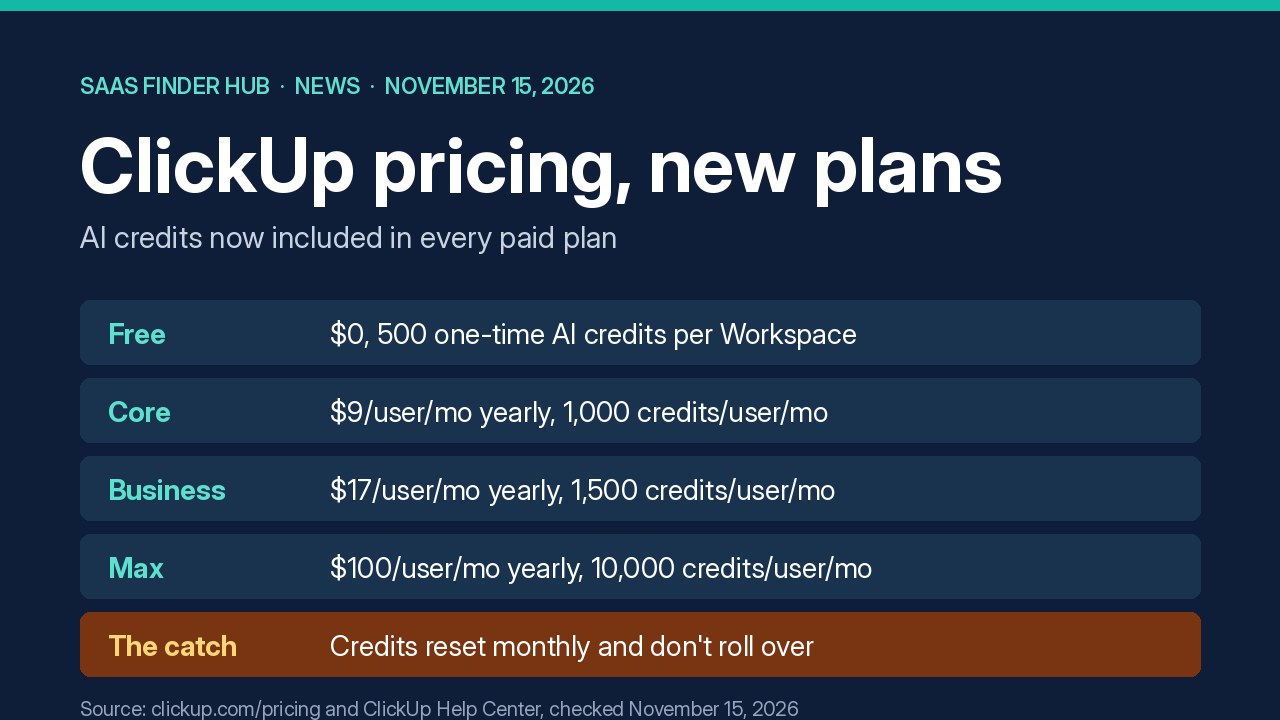
ClickUp pricing on the new plans
US prices as shown on November 15, 2026. The page lists a crossed-out "regular price" beside each yearly rate and says yearly billing saves up to 33%.
| Plan | Price (billed yearly) | AI credits |
|---|---|---|
| Free Forever | $0 | 500 per Workspace, one time |
| Core | $9/user/mo (regular price $12) | 1,000 per user/mo, pooled |
| Business | $17/user/mo (regular price $25) | 1,500 per user/mo, pooled |
| Enterprise | Contact sales | 3,000 per user/mo, pooled |
| Max | $100/user/mo (regular price $120) | 10,000 per user/mo, pooled |
ClickUp upgrades a whole Workspace at once, so every member is billed, not just the people who use AI.
What the AI credits pay for
According to ClickUp's AI Credits help article, credits power the automatic AI features: Super Agents, AI Automations (formerly Autopilot Agents), Artifacts, AI Fields, image and video generation and more:
- Credits are shared across the Workspace and reset on the first of each month.
- Usage isn't one credit per request; it varies by feature, model and context. Every Super Agent run uses credits, even one that only answers.
- On Max, AI Fields, image generation, dashboard cards and AI Automations are unlimited. Super Agents and Artifacts still use credits on every plan.
What existing ClickUp customers should know
ClickUp's Intro to pricing article says new Workspaces start on the new plans, and some existing ones are being moved over gradually. If yours is upgraded, the owner gets an email and admins see a "See what changes" notice under Upcoming Bill. No features are removed, and any price change applies at renewal, no earlier than January 2027. Some Workspaces get no price change. Workspaces that haven't been upgraded keep their current plan and price.
The downside: credits don't roll over
Unused credits expire at the end of each month, and once the pool is used up, credit-based AI features pause until you buy more credits or upgrade. Because ClickUp doesn't publish a fixed cost per task, it's hard to predict how far 1,000 or 1,500 credits per seat will go if your team leans on Super Agents.
Who each plan suits
Small teams that need tasks, docs and light AI can start on Core. Business adds advanced dashboards, timesheets and 10,000 automations a month. Max only pays off with heavy AI use.
For other tools that moved AI into credit pools, see our posts on Notion's Business plan and HubSpot's AI spend caps, or browse project management options in the tools directory.
FAQ
Is ClickUp's free plan still free?
Yes. Free Forever is $0, needs no card, and includes 500 one-time AI credits per Workspace.
Can I still buy the ClickUp Brain add-on?
Not on the new plans. ClickUp says the Brain AI and Everything AI add-ons aren't sold there because AI is included, but you can still buy extra AI credits.
Will my ClickUp price go up?
Only if your Workspace is upgraded and your notice shows a change. ClickUp says price updates start no earlier than January 2027 and take effect at renewal, not mid-term.
Sources
- ClickUp pricing page, checked November 15, 2026
- ClickUp Help: AI Credits availability and limits
- ClickUp Help: Intro to pricing