News
X Lift: X’s AI builds an ad campaign from your website URL
No affiliate link: X Lift has no affiliate program and this post contains no affiliate links. Links to X and to news coverage are normal source links. Read our affiliate disclosure.
X announced X Lift on October 6, 2026 at Advertising Week New York. It is an AI ads product inside X Ads Manager: you enter your business website, and X’s AI drafts the ads and sets up the campaign for you. It is aimed at small businesses and first-time advertisers. Here is what X has said it does, what it hasn’t said yet, and what to check before you put money behind it.
What X Lift does
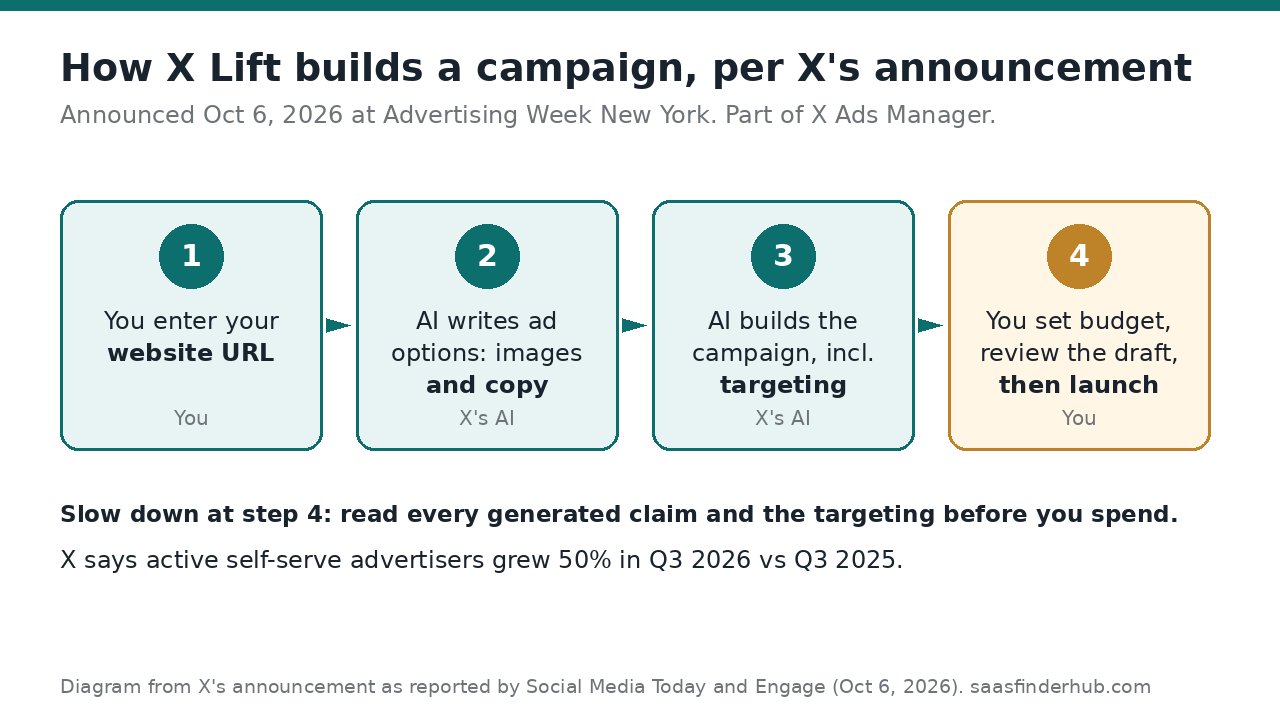
X’s own announcement post from @XBusiness calls X Lift “our new AI-powered ads product” and says you simplify campaign setup “by setting your destination and goal.” According to Social Media Today and X’s statement quoted by Engage, the flow is:
- Enter your website URL. X’s AI reads the site and generates a set of ad options, with images and copy, that you choose from.
- It builds the whole campaign. That includes the targeting, so you don’t configure audiences by hand.
- You set the budget. Per X’s statement, you set the budget, check the draft and can launch right away.
X also said its number of active self-serve advertisers grew 50% in the third quarter of 2026 compared with the same quarter of 2025, and that more updates are coming.
Who it is for
- Small businesses and solo founders who have never run X ads and get stuck in campaign setup
- Teams that want a quick first draft of ad creative from an existing landing page
- Not a fit if you need full manual control over every audience and placement from the start
The downside: you are trusting X’s defaults with real money
X Lift writes the ads and picks the targeting, and the announcement doesn’t say how much of that you can see or change before launch. X also hasn’t published results data for X Lift campaigns yet. The ad budget is real spend, so treat the first campaign as a small paid test, not a finished strategy.
A checklist before you launch an X Lift campaign
- Fix the page first. The URL is the brief. If your prices, offer or headline are out of date on the site, the ads will repeat them.
- Start small and set an end date. Pick a budget you can afford to lose while you learn.
- Read every claim in the generated ads. Check prices, discounts and product names against your site. You are responsible for what the ads say.
- Look at the targeting before you spend. If it doesn’t match who actually buys from you, change it or don’t launch.
- Tag the link. Add UTM parameters so clicks show up in your own analytics, not only in X’s dashboard.
- Judge it after a week. Compare cost per click or per signup with what you get from free posting before you raise the budget.
Don’t have a landing page to point the ads at yet? Our Typeform AI landing page builder post covers one way to build a page with a form on a free plan. For more options, see our tools page.
FAQ
What is X Lift?
An AI-powered ads product from X, announced October 6, 2026, that turns a business website URL into ad options and a full campaign, including targeting.
How much does X Lift cost?
X’s announcement doesn’t list a separate fee for X Lift. What you set is your ad budget, which is what you spend on the ads.
Do I still need to review the ads?
Yes. X’s statement describes reviewing the draft before launch. AI-written ads can get prices or claims wrong, so check every line.
Sources
- @XBusiness announcement post (X, October 6, 2026; checked October 8, 2026)
- X launches AI-powered ad creation option (Social Media Today, October 6, 2026; checked October 8, 2026)
- X punta sull’AI con X Lift (Engage, October 6, 2026, quoting X’s statement; checked October 8, 2026)
- X introduces X Lift to automate ad creation and campaign setup (Social Samosa, October 7, 2026; checked October 8, 2026)